On this page I will give an example on now to use the ABT - Allan's build tool to build a simple Hello world application.
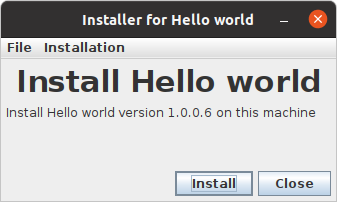
This build will compile an application with an executable jar, versioning, unit test, Javadoc and a download site containing a cross-platform GUI installer and release notes.
The application will contain an automatic check for and installation of updates.
Compile
Create a new directory called "Getting started test".
Create a sub directory in it called "src".
In that directory create a source code file called "HelloWorld.java" containing the following code:
In the "Getting started test" directory (From now on called the module home directory) create a file called "Hello world.abt" (The module's ABT Module Property File) containing the following text:
SourcePath=src
Open a terminal and run the follow command:
allan@allan-Aspire-A515-52G:~/Mit/Java/ABT/ABT/Getting started test$ abt
ABT version 1.0.18.14 (Build: 816) is running
2024-08-05 16:46:42 Exception occurred in thread: java.lang.Thread [main]
abt.property.ConfigurationException: File "/home/allan/.abt/ABT configuration.txt" doesn't exist
at abt.property.AbstractPropertiesFile.<init>(AbstractPropertiesFile.java:56)
at abt.property.AbtConfigurationFile.<init>(AbtConfigurationFile.java:146)
at abt.AllansBuildToolMain.main(AllansBuildToolMain.java:123)
Launch of ABT failed. Return: 1
Press any key to terminate
NOTE: This output will depend on platform, version of platform and version of ABT. This example is from Linux and is slightly modified.
The command failed, but it gave the location of the ABT Configuration File (This location will depend on platform).
Create the specified file.
Setting up JDKs
Depending on platform, version of platform and of number of installed JDKs, you may need to specify which JDK to use.
If this is needed (try without) it is done by added a line in the following format:
JdkHomeBinPath=<JDK bin directory location>;<version>
When using ABT it is recommended to set up the following.
On Windows it is recommended to set the environment variables "NO_PAUSE" and "NO_ERROR_PAUSE" to "true":
C:\Allan\Getting started test>SET NO_PAUSE=TRUEC:\Allan\Getting started test>SET NO_ERROR_PAUSE=TRUE
On Linux it is recommended to set the following:
allan@allan-Aspire-A515-52G:~/Mit/Java/ABT/ABT/Getting started test$ export ABT_SUMMARY_REPORT_MAX_WIDTH=$(tput cols)
First compile
Run the command again
allan@allan-Aspire-A515-52G:~/Mit/Java/ABT/ABT/Getting started test$ abt
ABT version 1.0.18.14 (Build: 816) is running
Processing module "Hello world"...
Resolving dependencies...
Resolving dependencies for module "Hello world"...
Compiling module "Hello world"...
Compiling content of the ABT module "Hello world"...
...compiling of module "Hello world" is complete
----------------------------------------------------------------------- B U I L D S U M M A R Y ------------------------------------------------------------------------
Module name Result Compile time Total build time Processing caused by
Hello world Successful 528 ms 528 ms The module source of ABT module "Hello world" needs to be compiled because the output directory is missing.
Total compile successful: 1
Total build time: 543 ms
Jar file deploy
The jar file for the hello world application has now been generated in ABT temporary output directories.
To get the jar file copied to the module home directory, add the following line the ABT Module Property File:
JarFile.Deploy=.
and run the command again.
allan@allan-Aspire-A515-52G:~/Mit/Java/ABT/ABT/Getting started test$ abt
ABT version 1.0.18.14 (Build: 816) is running
Processing module "Hello world"...
Resolving dependencies...
Resolving dependencies for module "Hello world"...
Compiling module "Hello world"...
Compiling content of the ABT module "Hello world"...
...compiling of module "Hello world" is complete
--------------------------------------------------------------------------------------------------- B U I L D S U M M A R Y -------------------------------------------------------------------------...
Module name Result Compile time Total build time Processing caused by ...
Hello world Successful 532 ms 532 ms The module source of ABT module "Hello world" needs to be compiled because of changed of the ABT module property file (2024-09-02 13:10:...
(NOTE: Some lines where cut in width by ABT)
Total compile successful: 1
Total build time: 548 ms
A file named "hello-world.jar" will now exist in the "Getting started test" directory.
Running
To make the jar executable, add the following to the ABT Module Property File:
JarFileMainClass=HelloWorld
Run the "abt" command:
allan@allan-Aspire-A515-52G:~/Mit/Java/ABT/ABT/Getting started test$ abt
ABT version 1.0.18.14 (Build: 816) is running
Processing module "Hello world"...
Resolving dependencies...
Resolving dependencies for module "Hello world"...
Compiling module "Hello world"...
Compiling content of the ABT module "Hello world"...
WARNING: The jar deploy destination "/home/allan/Mit/Java/ABT/ABT/Getting started test/hello-world.jar" already exists and will be overwritten with a newer version
...compiling of module "Hello world" is complete
--------------------------------------------------------------------------------------------------- B U I L D S U M M A R Y -------------------------------------------------------------------------...
Module name Result Compile time Total build time Processing caused by ...
Hello world Successful 635 ms 635 ms The module source of ABT module "Hello world" needs to be compiled because of changed of the ABT module property file (2024-09-02 13:10:...
(NOTE: Some lines where cut in width by ABT)
Total compile successful: 1
Total build time: 655 ms
The jar file is now executable, and can run with the following command:
allan@allan-Aspire-A515-52G:~/Mit/Java/ABT/ABT/Getting started test$ java -jar hello-world.jar
Hello world
Versioning
By adding the following to the ABT Module Property File, ABT will create and maintain a source file, that contains the module's version number (and build number):
VersionFileClassName=HelloWorldVersion
Run ABT
allan@allan-Aspire-A515-52G:~/Mit/Java/ABT/ABT/Getting started test$ abt
ABT version 1.0.18.14 (Build: 816) is running
Processing module "Hello world"...
Resolving dependencies...
Resolving dependencies for module "Hello world"...
Compiling module "Hello world"...
Compiling content of the ABT module "Hello world"...
...compiling of module "Hello world" is complete
------------------------------------------------------------------------------------------------------------- B U I L D S U M M A R Y ---------------------------------------------------------------...
Module name Result Version Compile time Total build time Processing caused by ...
Hello world Successful 1.0.0 (1(Added)) 532 ms 532 ms The module source of ABT module "Hello world" needs to be compiled because of changed of the ABT module property fil...
(NOTE: Some lines where cut in width by ABT)
Total compile successful: 1
Total build time: 549 ms
NOTE: All output files will now contain a version number, and this is automatically incremented on every run (compile) of this module.
This may cause version (and build) number to differ from yours in file names and output for the rest of this page.
To run the new version use the following command:
NOTE: You may need to modify the version number to your version number in the command below.
allan@allan-Aspire-A515-52G:~/Mit/Java/ABT/ABT/Getting started test$ java -jar hello-world-1.0.0.jar
Hello world
Unit test
To set up unit test do the following:
Create a directory named "Unit test src" in the module home directory.
Create a file named "HelloWorldTest.java" in this directory with the following content:
import java.io.PrintStream;publicclassHelloWorldTest{privatestaticfinalStringEXPECTED_MESSAGE="Hello world";privatestaticbooleanmessagePrinted=false;publicstaticvoidmain(String[]args){System.out.println("This is the unit test of the hello world application");System.setOut(newPrintStream(System.out){@Overridepublicvoidprint(Strings){super.print(s);if(!s.equals(EXPECTED_MESSAGE)){thrownewRuntimeException("Printed message \""+s+"\" is not expected message \""+EXPECTED_MESSAGE+"\"");}messagePrinted=true;}});HelloWorld.main(null);if(!messagePrinted){thrownewRuntimeException("Expected message \""+EXPECTED_MESSAGE+"\" was not printed");}}}
Add the following to the ABT Module Property File, to make ABT compile and run the unit test:
UnitTestSourcePath=Unit test src/UnitTestMainClass=HelloWorldTest
Run ABT
allan@allan-Aspire-A515-52G:~/Mit/Java/ABT/ABT/Getting started test$ abt
ABT version 1.0.18.14 (Build: 816) is running
Processing module "Hello world"...
Resolving dependencies...
Resolving dependencies for module "Hello world"...
Compiling module "Hello world"...
Compiling content of the ABT module "Hello world"...
...compiling of module "Hello world" is complete
Unit testing module "Hello world"
This is the unit test of the hello world application
--------------------------------------------------------------------------------------------------------------------------------------------------------------------------------- B U I L D S U M M A ...
Module name Result Version Compile time Unit test time Total build time ...
Hello world Successful 1.0.0 (1) -> 1.0.0.1 (2) 631 ms 605 ms 1,236 second The module source of ABT module "Hello world" needs to be compiled because of changed of t...
(NOTE: Some lines where cut in width by ABT)
Total compile successful: 1
Total unit test successful: 1
Total build time: 1,259 second
Javadoc
By adding the following to the ABT Module Property File, ABT will generate Javadoc:
JavadocGenerate=true
Run ABT
allan@allan-Aspire-A515-52G:~/Mit/Java/ABT/ABT/Getting started test$ abt
ABT version 1.0.18.14 (Build: 816) is running
Processing module "Hello world"...
Resolving dependencies...
Resolving dependencies for module "Hello world"...
Compiling module "Hello world"...
Compiling content of the ABT module "Hello world"...
...compiling of module "Hello world" is complete
Unit testing module "Hello world"
This is the unit test of the hello world application
Hello world
Creating Javadoc for Hello world...
Loading source file /home/allan/Mit/Java/ABT/ABT/Getting started test/src/HelloWorld.java...
Loading source file /home/allan/Mit/Java/ABT/ABT/Getting started test/src/HelloWorldVersion.java...
Constructing Javadoc information...
Creating destination directory: "/home/allan/Mit/Java/ABT/ABT/Getting started test/Abt-1.0.18.14/Temporary output/Hello world/Javadoc/"
Standard Doclet version 11.0.23
Building tree for all the packages and classes...
Generating /home/allan/Mit/Java/ABT/ABT/Getting started test/Abt-1.0.18.14/Temporary output/Hello world/Javadoc/HelloWorld.html...
Generating /home/allan/Mit/Java/ABT/ABT/Getting started test/Abt-1.0.18.14/Temporary output/Hello world/Javadoc/HelloWorldVersion.html...
Generating /home/allan/Mit/Java/ABT/ABT/Getting started test/Abt-1.0.18.14/Temporary output/Hello world/Javadoc/package-summary.html...
Generating /home/allan/Mit/Java/ABT/ABT/Getting started test/Abt-1.0.18.14/Temporary output/Hello world/Javadoc/package-tree.html...
Generating /home/allan/Mit/Java/ABT/ABT/Getting started test/Abt-1.0.18.14/Temporary output/Hello world/Javadoc/constant-values.html...
Building index for all the packages and classes...
Generating /home/allan/Mit/Java/ABT/ABT/Getting started test/Abt-1.0.18.14/Temporary output/Hello world/Javadoc/overview-tree.html...
Generating /home/allan/Mit/Java/ABT/ABT/Getting started test/Abt-1.0.18.14/Temporary output/Hello world/Javadoc/index-all.html...
Building index for all classes...
Generating /home/allan/Mit/Java/ABT/ABT/Getting started test/Abt-1.0.18.14/Temporary output/Hello world/Javadoc/allclasses-index.html...
Generating /home/allan/Mit/Java/ABT/ABT/Getting started test/Abt-1.0.18.14/Temporary output/Hello world/Javadoc/allpackages-index.html...
Generating /home/allan/Mit/Java/ABT/ABT/Getting started test/Abt-1.0.18.14/Temporary output/Hello world/Javadoc/deprecated-list.html...
Building index for all classes...
Generating /home/allan/Mit/Java/ABT/ABT/Getting started test/Abt-1.0.18.14/Temporary output/Hello world/Javadoc/allclasses.html...
Generating /home/allan/Mit/Java/ABT/ABT/Getting started test/Abt-1.0.18.14/Temporary output/Hello world/Javadoc/allclasses.html...
Generating /home/allan/Mit/Java/ABT/ABT/Getting started test/Abt-1.0.18.14/Temporary output/Hello world/Javadoc/index.html...
Generating /home/allan/Mit/Java/ABT/ABT/Getting started test/Abt-1.0.18.14/Temporary output/Hello world/Javadoc/help-doc.html...
---------------------------------------------------------------------------------------------------------------------------------------------------------------------------------------------------------...
Module name Result Version Compile time Unit test time Javadoc Total build time ...
Hello world Successful 1.0.0.1 (2) -> 1.0.0.2 (3) 741 ms 606 ms 803 ms 2,150 seconds The module source of ABT module "Hello world" needs to be compiled because of...
(NOTE: Some lines where cut in width by ABT)
Total compile successful: 1
Total unit test successful: 1
Total Javadoc successful: 1
Total build time: 2,165 seconds
Javadoc deploy
By adding the following to the ABT Module Property File, ABT will copy the Javadoc (and create) to the "Javadoc" directory (This is optional):
JavadocOutputPath.Deploy=Javadoc
Run ABT again
allan@allan-Aspire-A515-52G:~/Mit/Java/ABT/ABT/Getting started test$ abt
ABT version 1.0.18.14 (Build: 816) is running
Processing module "Hello world"...
Resolving dependencies...
Resolving dependencies for module "Hello world"...
Compiling module "Hello world"...
Compiling content of the ABT module "Hello world"...
...compiling of module "Hello world" is complete
Unit testing module "Hello world"
This is the unit test of the hello world application
Hello world
Creating Javadoc for Hello world...
Loading source file /home/allan/Mit/Java/ABT/ABT/Getting started test/src/HelloWorld.java...
Loading source file /home/allan/Mit/Java/ABT/ABT/Getting started test/src/HelloWorldVersion.java...
Constructing Javadoc information...
Creating destination directory: "/home/allan/Mit/Java/ABT/ABT/Getting started test/Abt-1.0.18.14/Temporary output/Hello world/Javadoc/"
Standard Doclet version 11.0.23
Building tree for all the packages and classes...
Generating /home/allan/Mit/Java/ABT/ABT/Getting started test/Abt-1.0.18.14/Temporary output/Hello world/Javadoc/HelloWorld.html...
Generating /home/allan/Mit/Java/ABT/ABT/Getting started test/Abt-1.0.18.14/Temporary output/Hello world/Javadoc/HelloWorldVersion.html...
Generating /home/allan/Mit/Java/ABT/ABT/Getting started test/Abt-1.0.18.14/Temporary output/Hello world/Javadoc/package-summary.html...
Generating /home/allan/Mit/Java/ABT/ABT/Getting started test/Abt-1.0.18.14/Temporary output/Hello world/Javadoc/package-tree.html...
Generating /home/allan/Mit/Java/ABT/ABT/Getting started test/Abt-1.0.18.14/Temporary output/Hello world/Javadoc/constant-values.html...
Building index for all the packages and classes...
Generating /home/allan/Mit/Java/ABT/ABT/Getting started test/Abt-1.0.18.14/Temporary output/Hello world/Javadoc/overview-tree.html...
Generating /home/allan/Mit/Java/ABT/ABT/Getting started test/Abt-1.0.18.14/Temporary output/Hello world/Javadoc/index-all.html...
Building index for all classes...
Generating /home/allan/Mit/Java/ABT/ABT/Getting started test/Abt-1.0.18.14/Temporary output/Hello world/Javadoc/allclasses-index.html...
Generating /home/allan/Mit/Java/ABT/ABT/Getting started test/Abt-1.0.18.14/Temporary output/Hello world/Javadoc/allpackages-index.html...
Generating /home/allan/Mit/Java/ABT/ABT/Getting started test/Abt-1.0.18.14/Temporary output/Hello world/Javadoc/deprecated-list.html...
Building index for all classes...
Generating /home/allan/Mit/Java/ABT/ABT/Getting started test/Abt-1.0.18.14/Temporary output/Hello world/Javadoc/allclasses.html...
Generating /home/allan/Mit/Java/ABT/ABT/Getting started test/Abt-1.0.18.14/Temporary output/Hello world/Javadoc/allclasses.html...
Generating /home/allan/Mit/Java/ABT/ABT/Getting started test/Abt-1.0.18.14/Temporary output/Hello world/Javadoc/index.html...
Generating /home/allan/Mit/Java/ABT/ABT/Getting started test/Abt-1.0.18.14/Temporary output/Hello world/Javadoc/help-doc.html...
---------------------------------------------------------------------------------------------------------------------------------------------------------------------------------------------------------...
Module name Result Version Compile time Unit test time Javadoc Total build time ...
Hello world Successful 1.0.0.2 (3) -> 1.0.0.3 (4) 749 ms 605 ms 810 ms 2,165 seconds The module source of ABT module "Hello world" needs to be compiled because of...
(NOTE: Some lines where cut in width by ABT)
Total compile successful: 1
Total unit test successful: 1
Total Javadoc successful: 1
Total build time: 2,234 seconds
and the generated Javadoc can be seen with the following command (On Linux using Firefox):
allan@allan-Aspire-A515-52G:~/Mit/Java/ABT/ABT/Getting started test$ firefox Javadoc/index.html
Reduce log output
By adding the following to the ABT Configuration File the log output can be reduced:
Log=falseJavadocLogLevel=Quiet
The ABT output is now reduced to:
allan@allan-Aspire-A515-52G:~/Mit/Java/ABT/ABT/Getting started test$ abt
ABT version 1.0.18.14 (Build: 816) is running
This is the unit test of the hello world application
Hello world
Creating destination directory: "/home/allan/Mit/Java/ABT/ABT/Getting started test/Abt-1.0.18.14/Temporary output/Hello world/Javadoc/"
---------------------------------------------------------------------------------------------------------------------------------------------------------------------------------------------------------...
Module name Result Version Compile time Unit test time Javadoc Total build time ...
Hello world Successful 1.0.0.3 (4) -> 1.0.0.4 (5) 646 ms 706 ms 828 ms 2,182 seconds The module source of ABT module "Hello world" needs to be compiled because of...
(NOTE: Some lines where cut in width by ABT)
Total compile successful: 1
Total unit test successful: 1
Total Javadoc successful: 1
Total build time: 2,234 seconds
Installer
By completing the following steps, ABT will create a cross-platform GUI installer of the Hello world application.
Download the ABT - Installer jar from the project's download site
Unzip the file to a permanent directory (E.g. a subdirectory called "ABT - Installer")
Delete downloaded the file (Optional)
Add the following to the ABT Configuration File:
Package.Desktop.CompiledInstallerPath=<Path to the directory where the file was unzipped>
e.g.:
Package.Desktop.CompiledInstallerPath=/home/allan/Mit/Java/ABT/ABT/Getting started test/ABT - Installer/
Add the following to the ABT Module Property File:
Package.Desktop.ApplicationType=TUI
Run ABT
allan@allan-Aspire-A515-52G:~/Mit/Java/ABT/ABT/Getting started test$ abt
ABT version 1.0.18.14 (Build: 816) is running
This is the unit test of the hello world application
Hello world
Creating destination directory: "/home/allan/Mit/Java/ABT/ABT/Getting started test/Abt-1.0.18.14/Temporary output/Hello world/Javadoc/"
---------------------------------------------------------------------------------------------------------------------------------------------------------------------------------------------------------...
Module name Result Version Compile time Unit test time Javadoc Package time Package type Total build time ...
Hello world Successful, Package Desktop: Successful 1.0.0.4 (5) -> 1.0.0.5 (6) 735 ms 706 ms 1,110 second 978 ms Desktop 3,530 seconds The module ...
(NOTE: Some lines where cut in width by ABT)
Total compile successful: 1
Total unit test successful: 1
Total Javadoc successful: 1
Total package successful: 1
Total build time: 3,650 seconds
Installer deploy
The cross-platform GUI installer of the Hello world application has now been generated in the ABT temporary output directories.
To get the installer copied to the module home directory, add the following line to the ABT Module Property File:
Package.Desktop.Deploy.Installer=
and run the command again.
allan@allan-Aspire-A515-52G:~/Mit/Java/ABT/ABT/Getting started test$ abt
ABT version 1.0.18.14 (Build: 816) is running
This is the unit test of the hello world application
Hello world
Creating destination directory: "/home/allan/Mit/Java/ABT/ABT/Getting started test/Abt-1.0.18.14/Temporary output/Hello world/Javadoc/"
---------------------------------------------------------------------------------------------------------------------------------------------------------------------------------------------------------...
Module name Result Version Compile time Unit test time Javadoc Package time Package type Total build time ...
Hello world Successful, Package Desktop: Successful 1.0.0.5 (6) -> 1.0.0.6 (7) 735 ms 705 ms 1,027 second 843 ms Desktop 3,311 seconds The module ...
(NOTE: Some lines where cut in width by ABT)
Total compile successful: 1
Total unit test successful: 1
Total Javadoc successful: 1
Total package successful: 1
Total build time: 3,414 seconds
A file named "Installer for Hello world version 1.0.0.6.jar" will now exist in the "Getting started test" directory.
This can be launch using the following command (On Linux):
allan@allan-Aspire-A515-52G:~/Mit/Java/ABT/ABT/Getting started test$ export NO_PAUSE=FALSEallan@allan-Aspire-A515-52G:~/Mit/Java/ABT/ABT/Getting started test$ java -jar Installer\ for\ Hello\ world\ version\ 1.0.0.6.jarallan@allan-Aspire-A515-52G:~/Mit/Java/ABT/ABT/Getting started test$ export NO_PAUSE=TRUE
Output from the installed Hello world application:
Checking OS...
Launching Hello world...
Hello world
The Java program ran successfully
Press any key to stop
Download site
ABT can maintain a download site containing various information about an ABT Module.
This is done by performing the following steps.
Add the following to the ABT Configuration File:
Note: The use of the "=" and the "+=" operator.
Add the following to the ABT Module Property File:
Package.DownloadSite.HtmlFile=Hello world Download site.html
Create a file named "Hello world Download site.html" in the module home directory with the following content:
<!DOCTYPE html>
<htmllang="en">
<head>
<metacharset="UTF-8">
<metacontent="width=device-width, initial-scale=1.0">
<title>ABT</title>
</head>
<body>
<h1>Download site for ABT</h1>
<br>
Download <ahref="Installer%20for%20ABT%20version%201.0.20.jar">this file</a> and run it.<br>
</body>
</html>
Note: This file can contain various replace strings (like "ABT" and "Installer%20for%20ABT%20version%201.0.20.jar" seen above) which will be replaced with information from the ABT Module.
See the documentation for details.
Run ABT
allan@allan-Aspire-A515-52G:~/Mit/Java/ABT/ABT/Getting started test$ abt
ABT version 1.0.18.14 (Build: 816) is running
This is the unit test of the hello world application
Hello world
Creating destination directory: "/home/allan/Mit/Java/ABT/ABT/Getting started test/Abt-1.0.18.14/Temporary output/Hello world/Javadoc/"
---------------------------------------------------------------------------------------------------------------------------------------------------------------------------------------------------------...
Module name Result Version Compile time Unit test time Javadoc Package time Pac...
Hello world Successful, Package DownloadSite: Successful, Package Desktop: Successful 1.0.0.6 (7) -> 1.0.0.7 (8) 734 ms 604 ms 807 ms 833 ms (833 ms, 755 ms) Downloa...
(NOTE: Some lines where cut in width by ABT)
Total compile successful: 1
Total unit test successful: 1
Total Javadoc successful: 1
Total package successful: 2
Total build time: 3,130 seconds
Download site deploy
The files for the download site for the Hello world application have now been generated in the ABT temporary output directories.
To get the download site copied to a directory name "Download site" in the module home directory, add the following line to the ABT Module Property File:
Package.DownloadSite.Deploy=Download site/
and run the command again.
allan@allan-Aspire-A515-52G:~/Mit/Java/ABT/ABT/Getting started test$ abt
ABT version 1.0.18.14 (Build: 816) is running
This is the unit test of the hello world application
Hello world
Creating destination directory: "/home/allan/Mit/Java/ABT/ABT/Getting started test/Abt-1.0.18.14/Temporary output/Hello world/Javadoc/"
---------------------------------------------------------------------------------------------------------------------------------------------------------------------------------------------------------...
Module name Result Version Compile time Unit test time Javadoc Package time ...
Hello world Successful, Package DownloadSite: Successful, Package Desktop: Successful 1.0.0.7 (8) -> 1.0.0.8 (9) 529 ms 606 ms 820 ms 1,038 second (1,038 second, 947 ms...
(NOTE: Some lines where cut in width by ABT)
Total compile successful: 1
Total unit test successful: 1
Total Javadoc successful: 1
Total package successful: 2
Total build time: 3,063 seconds
A directory named "Download site" will now exist in the "Getting started test" directory.
The content of the download site can be seen by opening the "Hello world Download site.html" file in the "Download site/Hello world/" directory or by running the following command (On Linux using Firefox):
allan@allan-Aspire-A515-52G:~/Mit/Java/ABT/ABT/Getting started test$ firefox "Download site/Hello world/Hello world Download site.html"
Release notes
ABT can maintain, update and validate a release notes file as an option.
To use this option adding the following to the ABT Module Property File:
Package.DownloadSite.ReleaseNotesFile=Hello world Release notes.txt
Create a file named "Hello world Release notes.txt" in the module home directory with the following content:
Version 1.0.20 (2026-11-04 14:36:10)
Note: This file is indented to be updated with changes as they are made, but this file is also updated by ABT in some cases (On release (Configurable) for instance).
Run ABT
allan@allan-Aspire-A515-52G:~/Mit/Java/ABT/ABT/Getting started test$ abt
ABT version 1.0.18.14 (Build: 816) is running
This is the unit test of the hello world application
Hello world
Creating destination directory: "/home/allan/Mit/Java/ABT/ABT/Getting started test/Abt-1.0.18.14/Temporary output/Hello world/Javadoc/"
---------------------------------------------------------------------------------------------------------------------------------------------------------------------------------------------------------...
Module name Result Version Compile time Unit test time Javadoc Package time ...
Hello world Successful, Package DownloadSite: Successful, Package Desktop: Successful 1.0.0.8 (9) -> 1.0.0.9 (10) 847 ms 707 ms 1,028 second 992 ms (992 ms, 836 ms) D...
(NOTE: Some lines where cut in width by ABT)
Total compile successful: 1
Total unit test successful: 1
Total Javadoc successful: 1
Total package successful: 2
Total build time: 3,731 seconds
A file named "Hello world Release notes.html" will now exist in the download site directory.
The release notes can be seen by opening the "Hello world Release notes.html" file in the "Download site/Hello world/" directory or by running the following command (On Linux using Firefox):
allan@allan-Aspire-A515-52G:~/Mit/Java/ABT/ABT/Getting started test$ firefox "Download site/Hello world/Hello world Release notes.html"
Automatic version check / update
ABT can in collaboration with the ABT - Update Checker project, be used by an application to check for new versions and install / update / upgrade to it.
This is done by a number of steps.
Download ABT - Update Checker
Go to the ABT - Update Checker download and download the zip file.
Unzip the downloaded zip file into the "Getting started test/ABT - Update Checker-1.0.4/" directory
Add dependencies to the Hello world application
Adding following to the ABT Module Property File:
JarDependency=ABT - Update Checker-1.0.4/abt---update-checker-1.0.4.jarJarDependency+=ABT - Update Checker-1.0.4/ar-common-1.1.7.jarPackage.Desktop.UserDataPathSystemProperty=UserDataPath// Hack to make GUIUtil.setLinuxApplicationName() work on OpenJDK 16 and especially above.Package.Desktop.AddOpens=java.desktop/sun.awt.X11=ALL-UNNAMED// Hack to make GUIApplicationUpdateHandler.upgrade() reflection call to process.pid() work on OpenJDK 16 and especially above.Package.Desktop.AddOpens+=java.base/java.lang=ALL-UNNAMED
Note: The use of the "=" and the "+=" operator.
Modify the Hello world application
Change the source code of the Hello application to the following:
import abtupdatechecker.AbstractUpdateHandler;import abtupdatechecker.AbtUpdateChecker;import arcommon.ApplicationUtil;publicclassHelloWorld{publicstaticvoidmain(String[]args){System.out.println("Hello world");AbtUpdateChecker.domains=newString[]{"http://localhost:8080/Getting started test/"};ApplicationUtil.printStartMessage=false;ApplicationUtil.printConfiguration=false;ApplicationUtil.initTuiApplication("Hello world",HelloWorldVersion.VERSION,HelloWorldVersion.BUILD);AbstractUpdateHandlerabstractUpdateHandler=AbtUpdateChecker.checkForUpdatesInTUIApplicationInTheBackgroundDelayed();abstractUpdateHandler.printResultIfInteresting();}}
Build the application
Run ABT
allan@allan-Aspire-A515-52G:~/Mit/Java/ABT/ABT/Getting started test$ abt
ABT version 1.0.18.14 (Build: 816) is running
This is the unit test of the hello world application
Hello world
Creating destination directory: "/home/allan/Mit/Java/ABT/ABT/Getting started test/Abt-1.0.18.14/Temporary output/Hello world/Javadoc/"
---------------------------------------------------------------------------------------------------------------------------------------------------------------------------------------------------------...
Module name Result Version Compile time Unit test time Javadoc Package time ...
Hello world Successful, Package DownloadSite: Successful, Package Desktop: Successful 1.0.0.9 (10) -> 1.0.0.10 (11) 843 ms 1,206 second 927 ms 962 ms (962 ms, 871 ms) Down...
(NOTE: Some lines where cut in width by ABT)
Total compile successful: 1
Total unit test successful: 1
Total Javadoc successful: 1
Total package successful: 2
Total build time: 4,086 seconds
Double click on the desktop icon (or use the following command on Linux)
allan@allan-Aspire-A515-52G:~/Mit/Java/ABT/ABT/Getting started test$ "hello world"
Checking OS...
Launching Hello world...
Hello world
Hello world version 1.0.0.10 (Build: 11) is running
CRASH_LOG_FILE_NAME: /home/allan/.hello world/Crash log for Hello world.txt
USER_DATA_PATH: /home/allan/.hello world/
The Java program ran successfully
Update the Hello application
Make a change to the source code or the ABT Module Property File and run ABT.
allan@allan-Aspire-A515-52G:~/Mit/Java/ABT/ABT/Getting started test$ abt
ABT version 1.0.18.14 (Build: 816) is running
This is the unit test of the hello world application
Hello world
Creating destination directory: "/home/allan/Mit/Java/ABT/ABT/Getting started test/Abt-1.0.18.14/Temporary output/Hello world/Javadoc/"
---------------------------------------------------------------------------------------------------------------------------------------------------------------------------------------------------------...
Module name Result Version Compile time Unit test time Javadoc Package time ...
Hello world Successful, Package DownloadSite: Successful, Package Desktop: Successful 1.0.0.10 (11) -> 1.0.0.11 (12) 755 ms 1,211 second 807 ms 883 ms (883 ms, 760 ms) Dow...
(NOTE: Some lines where cut in width by ABT)
Total compile successful: 1
Total unit test successful: 1
Total Javadoc successful: 1
Total package successful: 2
Total build time: 3,818 seconds
Run the Hello application (again)
Double click on the desktop icon (or use the following command on Linux)
allan@allan-Aspire-A515-52G:~/Mit/Java/ABT/ABT/Getting started test$ "hello world"
Checking OS...
Launching Hello world...
Hello world
Hello world version 1.0.0.10 (Build: 11) is running
CRASH_LOG_FILE_NAME: /home/allan/.hello world/Crash log for Hello world.txt
USER_DATA_PATH: /home/allan/.hello world/
ABT - Update Checker:
------
A new version of Hello world is available.
It can be downloaded from "http://localhost:8080/Getting%20started%20test/Hello%20world/Hello%20world%20Download%20site.html".
(Current version: "1.0.0.10". New version: "1.0.0.11".)
------
The Java program ran successfully
Total listing of files
The hello world application is now complete with cross-platform installer, download site and automatic version check.
This is the resulting total listing of files and their content.
Directory structure:
Getting started test
ABT - Installer
This directory contains the unzipped content of the jar from the ABT - Installer project. This is about 129 files and directories.
ABT - Update Checker-1.0.3.14
This directory contains the unzipped content of the zip from the ABT - Update Checker project. This directory contains 2 jar files.
Download site
This directory contains the "Hello world" directory, which contents the download site for the Hello world application. This directory contains at least 9 files and one directory. The number files are depend on the number of builds.
Javadoc
This directory contains the Javadoc for the Hello world application. This directory contains about 50 files and directories.
src
HelloWorld.java
This file contains the source code for the Hello world application. See listing below.
HelloWorldVersion.java
This file contains the source code for the version and build number of the Hello world application. This file is maintained by ABT.
Unit test src
HelloWorldTest.java
This file contains the source code for the unit test of the Hello world application. See listing below.
hello-world.jar
This jar contains the executable code of the Hello world application (First version)
hello-world-1.0.0.<version number>.jar
These jar files contains the executable code of the Hello world application (Later versions). The number files with this format will depend on the number of builds.
Hello world.abt
This plain text file is the ABT Module Property File containing the definition of the Hello world module. See listing below.
Hello world Download site.html
This HTML file contains the template for the download site of the Hello world application. See listing below.
Hello world Release notes.txt
This plain text file contains the release notes for the download site of the Hello world application. This file is manually edited by the developer and updated by ABT. See listing below.
Installer for Hello world version 1.0.0.<version number>.jar
These jar files contains the cross-platform GUI installer of the Hello world application. The number files with this format will depend on the number of builds.
HelloWorld.java source code
import abtupdatechecker.AbstractUpdateHandler;import abtupdatechecker.AbtUpdateChecker;import arcommon.ApplicationUtil;publicclassHelloWorld{publicstaticvoidmain(String[]args){System.out.println("Hello world");AbtUpdateChecker.domains=newString[]{"http://localhost:8080/Getting started test/"};ApplicationUtil.printStartMessage=false;ApplicationUtil.printConfiguration=false;ApplicationUtil.initTuiApplication("Hello world",HelloWorldVersion.VERSION,HelloWorldVersion.BUILD);AbstractUpdateHandlerabstractUpdateHandler=AbtUpdateChecker.checkForUpdatesInTUIApplicationInTheBackgroundDelayed();abstractUpdateHandler.printResultIfInteresting();}}
HelloWorldTest.java unit source code
import java.io.PrintStream;publicclassHelloWorldTest{privatestaticfinalStringEXPECTED_MESSAGE="Hello world";privatestaticbooleanmessagePrinted=false;publicstaticvoidmain(String[]args){System.out.println("This is the unit test of the hello world application");System.setOut(newPrintStream(System.out){@Overridepublicvoidprint(Strings){super.print(s);if(!s.equals(EXPECTED_MESSAGE)){thrownewRuntimeException("Printed message \""+s+"\" is not expected message \""+EXPECTED_MESSAGE+"\"");}messagePrinted=true;}});HelloWorld.main(null);if(!messagePrinted){thrownewRuntimeException("Expected message \""+EXPECTED_MESSAGE+"\" was not printed");}}}
HelloWorld.abt - The ABT Module Property File
Note: Optional parameters are marked with a comment.
Note: Paths may be different on your system.
SourcePath=src// This can be omitted if you don't want the generated jar file to be copied to the module home directoryJarFile.Deploy=.JarFileMainClass=HelloWorldVersionFileClassName=HelloWorldVersion// The follow two lines can be omitted if you don't want to have a unit testUnitTestSourcePath=Unit test src/UnitTestMainClass=HelloWorldTest// This can be omitted if you don't want to generate JavadocJavadocGenerate=true// This can be omitted if you don't want the generated Javadoc to be copied to the module home directory sub directory JavadocJavadocOutputPath.Deploy=JavadocPackage.Desktop.ApplicationType=TUI// This can be omitted if you don't want the installer to be copied to the module home directoryPackage.Desktop.Deploy.Installer=Package.DownloadSite.HtmlFile=Hello world Download site.html// This can be omitted if the web server uses the ABT temporary output directory directlyPackage.DownloadSite.Deploy=Download site/// This can be omitted if the release notes feature of ABT is unwantedPackage.DownloadSite.ReleaseNotesFile=Hello world Release notes.txtJarDependency=ABT - Update Checker-1.0.3.16/abt---update-checker-1.0.3.16.jarJarDependency+=ABT - Update Checker-1.0.3.16/ar-common-1.1.6.21.jarPackage.Desktop.UserDataPathSystemProperty=UserDataPath// Hack to make GUIUtil.setLinuxApplicationName() work on OpenJDK 16 and especially above.Package.Desktop.AddOpens=java.desktop/sun.awt.X11=ALL-UNNAMED// Hack to make GUIApplicationUpdateHandler.upgrade() reflection call to process.pid() work on OpenJDK 16 and especially above.Package.Desktop.AddOpens+=java.base/java.lang=ALL-UNNAMED
Hello world Download site.html download site HTML template
<!DOCTYPE html>
<htmllang="en">
<head>
<metacharset="UTF-8">
<metacontent="width=device-width, initial-scale=1.0">
<title>ABT</title>
</head>
<body>
<h1>Download site for ABT</h1>
<br>
Download <ahref="Installer%20for%20ABT%20version%201.0.20.jar">this file</a> and run it.<br>
</body>
</html>
Hello world Release notes.txt plain text file
Version 1.0.20 (2026-11-04 14:36:10)
ABT configuration.txt configuration file
NOTE: This file is not placed in the module home directory. It is placed in ABT's configuration / settings directory which is platform dependent.
Note: Optional parameters are marked with a comment.
Note: Paths may be different on your system.
// This is only required if more than one JDKs are installed (or the automatic JDK detection doesn't work on your platform)JdkHomeBinPath=/usr/lib/jvm/java-11-openjdk-amd64/bin/;1.11// The follow two lines can be omitted if you want the full log outputLog=falseJavadocLogLevel=QuietPackage.Desktop.CompiledInstallerPath=../../Getting started test/ABT - Installer/PackagingClass=abt.packaging.desktop.PackageDesktopPackagingClass+=abt.packaging.downloadsite.PackageDownloadSiteDefaultPackageType=DownloadSite
Hello world in a GUI version
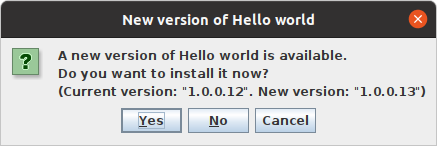
With a few changes the Hello world application can be changed into a GUI application. This will still contain a cross-platform installer, download site and automatic version check, but it also allows the user to choose to upgrade to the new version.
The following list contains the files that need to be changed to achieve that and the files content:
HelloWorld.java source code (GUI Version)
import javax.swing.SwingUtilities;import abtupdatechecker.AbtUpdateChecker;import arcommon.ApplicationUtil;importarcommon.ui.other.GUIUtil;publicclassHelloWorld{publicstaticvoidmain(String[]args){System.out.println("Hello world");AbtUpdateChecker.domains=newString[]{"http://localhost:8080/Getting started test/"};ApplicationUtil.printStartMessage=false;ApplicationUtil.printConfiguration=false;ApplicationUtil.initGuiApplication("Hello world",HelloWorldVersion.VERSION,HelloWorldVersion.BUILD);Runnablerunnable=newRunnable(){publicvoidrun(){AbtUpdateChecker.checkForUpdatesInGUIApplicationInTheBackground();GUIUtil.showInformation("Hello world");}};SwingUtilities.invokeLater(runnable);}}
HelloWorld.abt module property file (GUI Version)
Note: Optional parameters are marked with a comment.
SourcePath=srcJarFileMainClass=HelloWorldVersionFileClassName=HelloWorldVersionPackage.Desktop.ApplicationType=GUIPackage.DownloadSite.HtmlFile=Hello world Download site.html// This can be omitted if the web server uses the ABT temporary output directory directlyPackage.DownloadSite.Deploy=Download site/// This can be omitted if the release notes feature of ABT is unwantedPackage.DownloadSite.ReleaseNotesFile=Hello world Release notes.txtJarDependency=ABT - Update Checker-1.0.3.16/abt---update-checker-1.0.3.16.jarJarDependency+=ABT - Update Checker-1.0.3.16/ar-common-1.1.6.21.jarPackage.Desktop.UserDataPathSystemProperty=UserDataPath// Hack to make GUIUtil.setLinuxApplicationName() work on OpenJDK 16 and especially above.Package.Desktop.AddOpens=java.desktop/sun.awt.X11=ALL-UNNAMED// Hack to make GUIApplicationUpdateHandler.upgrade() reflection call to process.pid() work on OpenJDK 16 and especially above.Package.Desktop.AddOpens+=java.base/java.lang=ALL-UNNAMED
HelloWorld GUI version upgrade question
Complete
With this the Hello world application is complete. When ABT is asked to "package download site" the Hello world ABT Module Property File, it will complete the following:
The version and build numbers are incremented
The source code is compiled
An executable jar is generated
The unit test source is compiled
The unit test is run
Javadoc is generated
A cross-platform GUI installer is created
The download site is updated with the latest information and files
The release notes are validated, updated and placed on the download site
The application will automatically check for updates and automatically install them (if end user answers yes)